Vial Label PDF Fonts: Stop Substitution Before Artwork Approval
The right wording can still be the wrong artwork
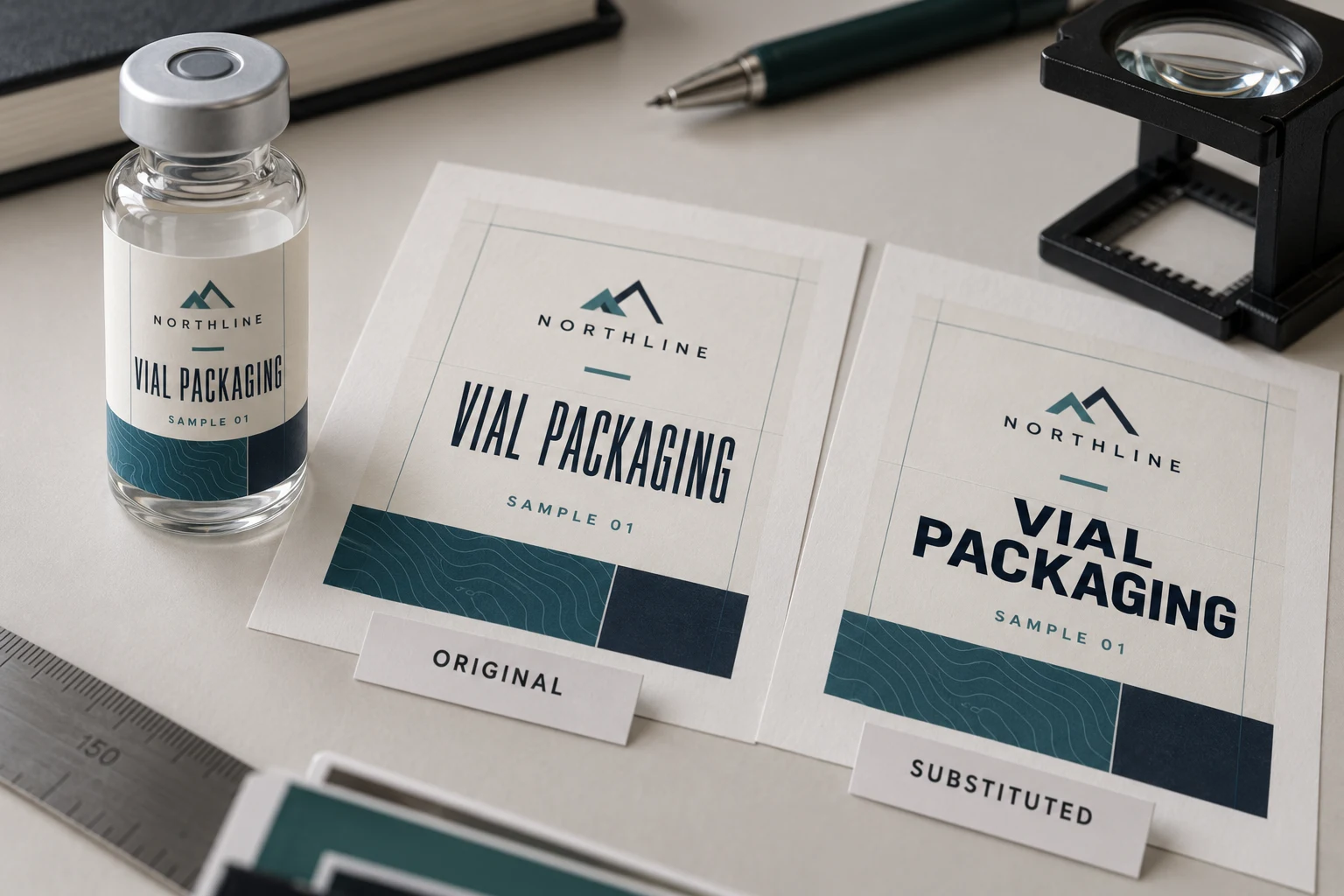
Your designer opens the vial label and sees one neat product-name line. The supplier’s preview wraps it into two. Nobody has changed the wording, yet the layout is no longer the file the buyer thought was ready. Before reducing the type or widening the label, check whether the exported PDF carries the intended fonts and whether the receiving workflow has substituted them.
I would settle that file question before asking for a new print quotation. A substituted typeface can change character shapes, spacing and line breaks. A larger label may hide the symptom while creating a new fit problem on the vial. The first decision is which exact exported file the supplier can reproduce and the buyer can approve.
Inspect the exported file, not only the editable master
Keep the editable artwork and the delivery PDF as separate, identified files. Open the actual PDF being sent, then compare it with the approved design at the finished label size. Check the product name, small information lines, symbols, punctuation and spacing. A screenshot of the designer’s application is a useful reference, but it does not establish what the exported file contains.
Adobe explains font embedding and substitution: embedding includes font information in a PDF so the recipient can reproduce the intended type. The supplier still needs to confirm whether the delivered file meets its production requirements. A familiar PDF extension alone is not a preflight result.
Ask the designer or prepress contact to report the font status of that named PDF. Record the application or check used and any unresolved warnings. Do not ask the purchasing team to install random font files or make silent substitutions merely to make a warning disappear. Font availability and permission to distribute a font are separate matters for the artwork owner to confirm.
Choose a correction that preserves the design
There are several possible routes. Re-exporting with suitable embedded fonts may preserve live text. An agreed outlined production copy can preserve letter shapes while changing editability. A deliberate replacement typeface can also be reasonable, provided someone reviews the resulting layout rather than calling it unchanged.
| What you observe | What to establish next | Approval consequence |
|---|---|---|
| Same wording, different wrapping | Compare font status and the exact PDF revision | Pause layout approval until the difference is explained |
| A symbol is missing or replaced | Identify the character and source font | Review the corrected glyph in the exported file |
| Supplier requests outlined type | Confirm the required production copy and keep an editable master | Check wording before conversion and inspect the delivered outlines |
| A replacement font is proposed | Compare shape, spacing and reading hierarchy | Treat the replacement as an artwork revision |
Outlining is not a substitute for proofreading. It can preserve a wrong word just as faithfully as a correct one. It also does not establish printed color, adhesive suitability or how small text will look on the finished construction. Resolve those questions through the appropriate proof or physical review.
Make the comparison small enough to finish
Start with the affected text rather than comparing every decorative detail from memory. Put the original reference and receiving preview beside each other at the same scale. Name the changed line, character or spacing. If the receiver’s image was resized or captured at a different zoom, establish that before blaming the font.
Then compare the corrected PDF with the source wording. A visual repair can accidentally introduce a text change when somebody retypes a line. Keep a short record: source artwork revision, exported PDF filename, correction made, reviewer and release decision. If several SKUs share the same type treatment, inspect the longest names and any special characters as well as the shortest label.
The proof approval checklist covers the wider release decision. This font check supplies one part of that record. It should not become another unconnected approval in a message thread.
Two illustrative briefs need different solutions
Consider an illustrative launch buyer with one design and final wording. The supplier asks for an outlined delivery copy. If the artwork owner agrees, the buyer can retain the editable master, inspect the outlined PDF and approve that exact version. Rebuilding the brand identity is unnecessary if the intended shapes are already preserved.
Now consider a buyer preparing a changing SKU family. Product names are still being edited, and some versions use characters absent from the first draft. Keeping a well-managed editable master matters here. Flattening every working file prematurely may make each later correction harder. The useful route is to settle the font coverage, then produce an identified delivery copy after the wording is ready.
These are planning examples, not RP Labels order histories. They also show when another solution wins: if the original font cannot appropriately be used in the required workflow, an approved replacement can be better than repeated attempts to preserve an unsuitable file. The replacement should be visible in the review, not hidden behind a promise that the design is identical.
Questions before sending the production PDF
Does a correct screenshot prove the PDF is ready?
No. It shows one rendering in one context. Inspect the actual delivery PDF and ask the supplier to confirm its font requirements against that file.
Should every buyer outline every font?
There is no universal instruction for every workflow. Ask what the printer requires, preserve an editable master and review the production copy after any conversion.
Can a font check approve small-text print quality?
It can resolve a file dependency or substitution problem. It does not replace a finished-size review or a representative print sample where readability remains uncertain.
If the next task is future editing, the editable-artwork handover guide explains source deliverables and font-access dependencies separately from the released PDF.
Send a file that can be identified
For a custom vial label printing enquiry, provide the original artwork where appropriate, the proposed delivery PDF, vial dimensions and quantity per design. Mark the line or symbol that changed and identify the reference it should match. Use the project quote form to explain the remaining file question; send artwork by the existing email route with the same project reference. The next useful result is an agreed production file, not another screenshot that looks right on only one computer.